Apply Sim4Sys perspective
The Sim4Sys perspective provides access to the Sim4Sys Designer modeling features in Rhapsody and can be activated after applying the Sim4Sys plugin.
astuce
Make sure you have applied the plugin before creating the perspective.
APPLY SIM4SYS PERSPECTIVE
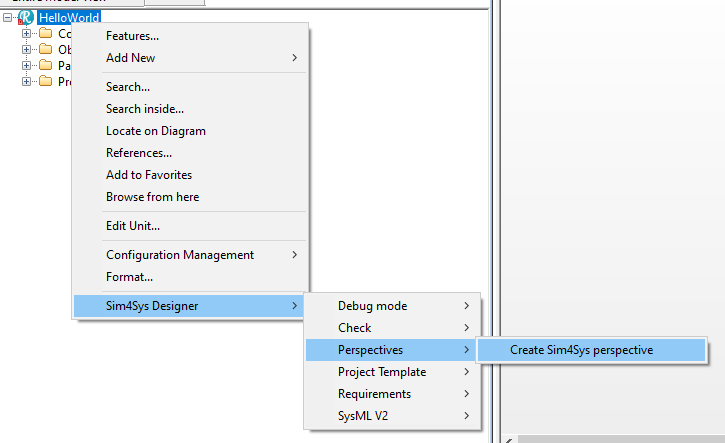
- Right Click on the Project
- Click on Sim4Sys Designer > Perspectives > Create Sim4Sys perspective
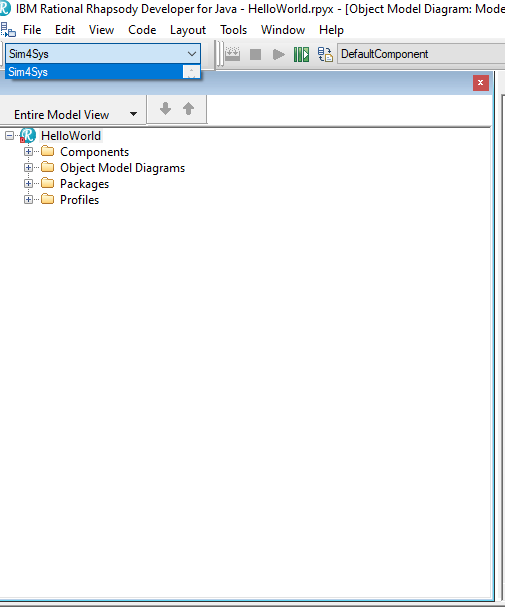
- Click on the Sim4Sys Perspective on the Toolbar
astuce
Even if the perspective is selected click on it again, sometime Rhapsody doesn't use the perspective even if it is selected.