Edit requirement template
If the standards requirement templates don't match your needs, you have the possibility to design your own template.
CREATE A NEW REQUIREMENT TEMPLATE
To create your requirement template, the simplest way is to create a model of this template.
To do that, click on File > New > Other..., and then select "RequirementTemplate Model"
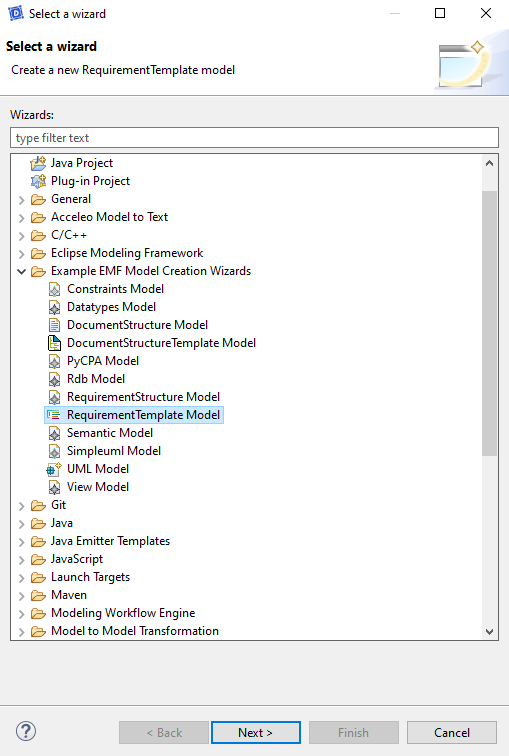
By clicking on Next, you have to chose the location of the new file and its name (e.g "MyRequirementTemplate.reqst").
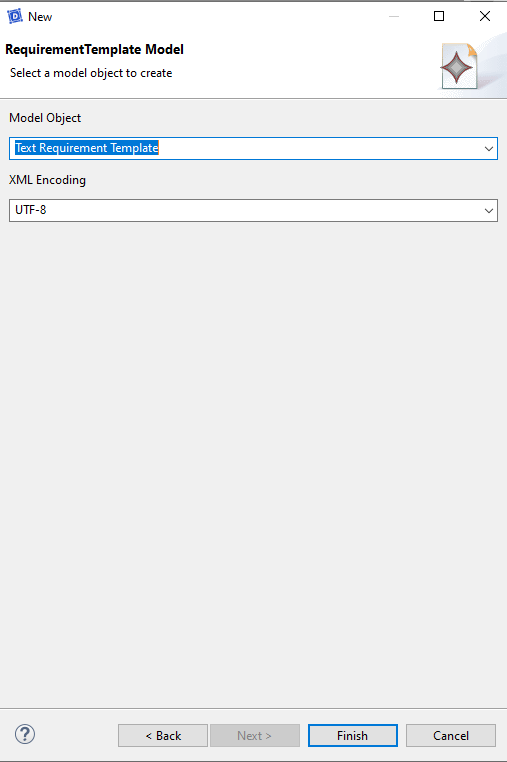
The first element of the template model has to be a "Text Requirement Template". You can click on Finish to create the basic template file (*.reqst).
To use your template, put it into the project where you want to use it. You should be able to select it when generating requirements.
EDIT A REQUIREMENT TEMPLATE
Several model elements are available to compose your requirement template.
Root Items
Root Transition
A root transition item enables to detail how a transition has to be generated as a requirement text.
The following properties are available:
| property | one/list | description | type |
|---|---|---|---|
| Exclude By Source Connectable Element Name | list | Exclude the transitions using the connectable element names indicated in this property | Text |
| Exclude By Source Type Name | list | Exclude the transitions using the type names indicated in this property | Text |
| Generate | one | Indicate if the element should be taken into account during the generation process | Boolean |
| Is Initialization | one | Indicate if a requirement should be generated for the initialization of a state | Boolean |
| Kind | list | Indicate which kind of transition this item should take into account | Enumeration: Local, External, Internal |
| Name | one | The name of the item visible in the template model | Text |
Root State
A root state item enables to detail how a state effect (entry, exit) has to be generated as a requirement text.
The following properties are available:
| property | one/list | description | type |
|---|---|---|---|
| Generate | one | Indicate if the element should be taken into account during the generation process | Boolean |
| Kind | list | Indicate which kind of effect this item should take into account | Enumeration: ENTRY, EXIT, DO_ACTIVITY |
| Name | one | The name of the item visible in the template model | Text |
Root Constraint
A root constraint item enables to detail how a constraint (e.g performance) has to be generated as a requirement text.
The following properties are available:
| property | one/list | description | type |
|---|---|---|---|
| Generate | one | Indicate if the element should be taken into account during the generation process | Boolean |
| Name | one | The name of the item visible in the template model | Text |
Leaf Items
Layout Template Item
A layout template item enables to insert an element of layout in the text (e.g a tabulation or a line break).
The following properties are available:
| property | one/list | description | type |
|---|---|---|---|
| Generate | one | Indicate if the element should be taken into account during the generation process | Boolean |
| Layout Application | one | The type of layout element to apply | Enumeration: LINE_BREAK, TAB |
| Name | one | The name of the item visible in the template model | Text |
Text Template Item
A text template item enables to insert a piece of text.
The following properties are available:
| property | one/list | description | type |
|---|---|---|---|
| Generate | one | Indicate if the element should be taken into account during the generation process | Boolean |
| Name | one | The name of the item visible in the template model | Text |
| Text | one | The text to insert | Text |
Higher Feature Template Item
A higher feature template item enables to display the name of the entity containing the specified entity (e.g product).
The following properties are available:
| property | one/list | description | type |
|---|---|---|---|
| Applied Styles | list | The styles to apply to the model element name | Enumeration: REMOVE_UNDERSCORES, ADD_UNDERSCORES, LOWER_CASE, UPPER_CASE |
| Generate | one | Indicate if the element should be taken into account during the generation process | Boolean |
| Name | one | The name of the item visible in the template model | Text |
Feature Template Item
A feature template item enables to display the name of the specified entity (e.g service).
The following properties are available:
| property | one/list | description | type |
|---|---|---|---|
| Applied Styles | list | The styles to apply to the model element name | Enumeration: REMOVE_UNDERSCORES, ADD_UNDERSCORES, LOWER_CASE, UPPER_CASE |
| Generate | one | Indicate if the element should be taken into account during the generation process | Boolean |
| Name | one | The name of the item visible in the template model | Text |
State Template Item
A state template item enables to display the name of a state.
The following properties are available:
| property | one/list | description | type |
|---|---|---|---|
| Applied Styles | list | The styles to apply to the model element name | Enumeration: REMOVE_UNDERSCORES, ADD_UNDERSCORES, LOWER_CASE, UPPER_CASE |
| Generate | one | Indicate if the element should be taken into account during the generation process | Boolean |
| Name | one | The name of the item visible in the template model | Text |
Action Leaf Template Item
An action leaf template item enables to display the name of a action (e.g a flow name or an activity name).
The following properties are available:
| property | one/list | description | type |
|---|---|---|---|
| Applied Styles | list | The styles to apply to the model element name | Enumeration: REMOVE_UNDERSCORES, ADD_UNDERSCORES, LOWER_CASE, UPPER_CASE |
| Generate | one | Indicate if the element should be taken into account during the generation process | Boolean |
| Name | one | The name of the item visible in the template model | Text |
Argument Value Leaf Template Item
An argument value leaf template item enables to display the name of the value of an argument (e.g the name of a intern variable).
The following properties are available:
| property | one/list | description | type |
|---|---|---|---|
| Generate | one | Indicate if the element should be taken into account during the generation process | Boolean |
| Name | one | The name of the item visible in the template model | Text |
Argument Name Leaf Template Item
An argument name leaf template item enables to display the name of an argument (e.g "value" if the argument was named like this).
The following properties are available:
| property | one/list | description | type |
|---|---|---|---|
| Generate | one | Indicate if the element should be taken into account during the generation process | Boolean |
| Name | one | The name of the item visible in the template model | Text |
Performance Leaf Template Item
A performance leaf template item enables to display the text of a performance (e.g "in less than 100 ms").
The following properties are available:
| property | one/list | description | type |
|---|---|---|---|
| Generate | one | Indicate if the element should be taken into account during the generation process | Boolean |
| Name | one | The name of the item visible in the template model | Text |
Condition Leaf Template Item
A condition leaf template item enables to display the text of a condition. It uses an operator mapper set.
The following properties are available:
| property | one/list | description | type |
|---|---|---|---|
| First Member Styles | list | The styles which are applied to the first member of the condition | Enumeration: REMOVE_UNDERSCORES, ADD_UNDERSCORES, LOWER_CASE, UPPER_CASE |
| Generate | one | Indicate if the element should be taken into account during the generation process | Boolean |
| Name | one | The name of the item visible in the template model | Text |
| Operator Set | one | The operator mapper set to use for the condition | Operator Mapper Set |
| Second Member Styles | list | The styles which are applied to the second member of the condition | Enumeration: REMOVE_UNDERSCORES, ADD_UNDERSCORES, LOWER_CASE, UPPER_CASE |
Condition Boolean Operator Template Item
A condition boolean operator template item enables to display the text of the boolean operator between two conditions. It uses an operator mapper set.
The following properties are available:
| property | one/list | description | type |
|---|---|---|---|
| Generate | one | Indicate if the element should be taken into account during the generation process | Boolean |
| Name | one | The name of the item visible in the template model | Text |
| Operator Set | one | The operator mapper set to use for the condition | Operator Mapper Set |
Trigger Template Item
A trigger template item enables to display the name of a trigger (e.g a flow name).
The following properties are available:
| property | one/list | description | type |
|---|---|---|---|
| Applied Styles | list | The styles to apply to the model element name | Enumeration: REMOVE_UNDERSCORES, ADD_UNDERSCORES, LOWER_CASE, UPPER_CASE |
| Generate | one | Indicate if the element should be taken into account during the generation process | Boolean |
| Name | one | The name of the item visible in the template model | Text |
Source Template Item
A source template item enables to display the name of a source (e.g a an actor name or a service).
The following properties are available:
| property | one/list | description | type |
|---|---|---|---|
| Applied Styles | list | The styles to apply to the model element name | Enumeration: REMOVE_UNDERSCORES, ADD_UNDERSCORES, LOWER_CASE, UPPER_CASE |
| Field To Use | one | The field which is used to generate this piece of text | Enumeration: REPRESENTED_ELEMENT_NAME, REPRESENTED_LIFELINE_NAME, REPRESENTED_ELEMENT_CLASS_NAME |
| Generate | one | Indicate if the element should be taken into account during the generation process | Boolean |
| Name | one | The name of the item visible in the template model | Text |
Statement Items
Action Statement Template Item
An action statement template item enables to define a complete statement transcription for a given action (e.g flow or activity). It contains other template items.
The following properties are available:
| property | one/list | description | type |
|---|---|---|---|
| Exclude By Target Connectable Element Name | list | Actions having the indicated connectable element name as target will not be generated | Text |
| Exclude By Target Class Name | list | Actions having the indicated class as target will not be generated | Text |
| Filter | list | Enable to filter an action in function of its position in a the list | Enumeration: ALL, FIRST, LAST, SINGLE, IN_BETWEEN |
| Generate | one | Indicate if the element should be taken into account during the generation process | Boolean |
| Kind | list | Enable to filter in function of the nature of the action | Enumeration: ALL, FLOW, ACTIVITY |
| Name | one | The name of the item visible in the template model | Text |
Argument Statement Template Item
An argument statement template item enables to define a complete statement transcription for a given argument (of a flow). It contains other template items.
The following properties are available:
| property | one/list | description | type |
|---|---|---|---|
| Filter | list | Enable to filter an action in function of its position in a the list | Enumeration: ALL, FIRST, LAST, SINGLE, IN_BETWEEN |
| Generate | one | Indicate if the element should be taken into account during the generation process | Boolean |
| Name | one | The name of the item visible in the template model | Text |
Performance Statement Template Item
A performance statement template item enables to define a complete statement transcription for a given performance. It contains other template items.
The following properties are available:
| property | one/list | description | type |
|---|---|---|---|
| Filter | list | Enable to filter an action in function of its position in a the list | Enumeration: ALL, FIRST, LAST, SINGLE, IN_BETWEEN |
| Generate | one | Indicate if the element should be taken into account during the generation process | Boolean |
| Name | one | The name of the item visible in the template model | Text |
Condition Statement Template Item
A condition statement template item enables to define a complete statement transcription for a given condition. It contains other template items.
The following properties are available:
| property | one/list | description | type |
|---|---|---|---|
| Filter | list | Enable to filter an action in function of its position in a the list | Enumeration: ALL, FIRST, LAST, SINGLE, IN_BETWEEN |
| Generate | one | Indicate if the element should be taken into account during the generation process | Boolean |
| Name | one | The name of the item visible in the template model | Text |
Trigger Statement Template Item
A trigger statement template item enables to define a complete statement transcription for a given trigger. It contains other template items. It enables to process trigger differently for some particular cases (e.g "when" flow).
The following properties are available:
| property | one/list | description | type |
|---|---|---|---|
| Exclude | list | Enable to exclude a flow by its name | Text |
| Filter | list | Enable to filter an action in function of its position in a the list | Enumeration: ALL, FIRST, LAST, SINGLE, IN_BETWEEN |
| Generate | one | Indicate if the element should be taken into account during the generation process | Boolean |
| Include [DEPRECATED] | list | Enable to include a flow by its name | Text |
| Name | one | The name of the item visible in the template model | Text |
Composite Items
Transition Actions Template Item
A transition actions template item enables to define with which action statement template items the actions will be transcripted.
The following properties are available:
| property | one/list | description | type |
|---|---|---|---|
| Action Statement Template Items | list | All the Action Statement Template Items to use | Action Statement Template Item |
| Generate | one | Indicate if the element should be taken into account during the generation process | Boolean |
| Name | one | The name of the item visible in the template model | Text |
State Actions Template Item
A state actions template item enables to define with which action statement template items the actions of a state will be transcripted.
The following properties are available:
| property | one/list | description | type |
|---|---|---|---|
| Action Statement Template Items | list | All the Action Statement Template Items to use | Action Statement Template Item |
| Generate | one | Indicate if the element should be taken into account during the generation process | Boolean |
| Name | one | The name of the item visible in the template model | Text |
Triggered behaviours Template Item
A triggers template item enables to define with which trigger statement template items the triggers will be transcribed.
The following properties are available:
| property | one/list | description | type |
|---|---|---|---|
| Generate | one | Indicate if the element should be taken into account during the generation process | Boolean |
| Name | one | The name of the item visible in the template model | Text |
| Trigger Statement Template Items | list | All the Trigger Statement Template Items to use | Trigger Statement Template Item |
Conditions Template Item
A conditions template item enables to define with which condition statement template items the conditions will be transcribed.
The following properties are available:
| property | one/list | description | type |
|---|---|---|---|
| Condition Statement Template Items | list | All the Condition Statement Template Items to use | Condition Statement Template Item |
| Generate | one | Indicate if the element should be taken into account during the generation process | Boolean |
| Name | one | The name of the item visible in the template model | Text |
Arguments Template Item
An arguments template item enables to define with which argument statement template items the arguments will be transcribed.
The following properties are available:
| property | one/list | description | type |
|---|---|---|---|
| Argument Statement Template Items | list | All the Argument Statement Template Items to use | Argument Statement Template Item |
| Generate | one | Indicate if the element should be taken into account during the generation process | Boolean |
| Name | one | The name of the item visible in the template model | Text |
Performances Template Item
A performances template item enables to define with which performance statement template items the performance will be transcribed.
The following properties are available:
| property | one/list | description | type |
|---|---|---|---|
| Performance Statement Template Items | list | All the Performance Statement Template Items to use | Performance Statement Template Item |
| Generate | one | Indicate if the element should be taken into account during the generation process | Boolean |
| Name | one | The name of the item visible in the template model | Text |
Operators
Operator Mapper Set
An operator mapper set enables to group a serie of mapper for the comparison operators and boolean operators used in conditions.
The following properties are available:
| property | one/list | description | type |
|---|---|---|---|
| Generate | one | Indicate if the element should be taken into account during the generation process | Boolean |
| Name | one | The name of the item visible in the template model | Text |
Comparison Operator Mapper
A comparison operator mapper enables to indicate how an operator has to be translated as text.
The following properties are available:
| property | one/list | description | type |
|---|---|---|---|
| Generate | one | Indicate if the element should be taken into account during the generation process | Boolean |
| Name | one | The name of the item visible in the template model | Text |
| Operator Kind | one | The kinds of operator which will be transcripted with this operator mapper | Enumeration: GREATER, LOWER, GREATER_OR_EQUAL_TO, LOWER_OR_EQUAL_TO, EQUAL_TO, DIFFERENT_FROM |
| Selector Kind | one | The kind of selector to determine when this operator mapper has to be used to transcribe an operator, depending on the nature of the elements which are compared | Enumeration: ALL, ONLY_ENUMERATIONS, ONLY_PRIMITIVE_TYPES |
| Text | one | The text to use for the corresponding operator | Text |
Boolean Operator Mapper
A boolean operator mapper enables to indicate how a boolean operator has to be transcripted as text. It is used to transcribe conditions.
The following properties are available:
| property | one/list | description | type |
|---|---|---|---|
| Generate | one | Indicate if the element should be taken into account during the generation process | Boolean |
| Name | one | The name of the item visible in the template model | Text |
| Operator Kind | one | The kinds of operator which will be transcripted with this operator mapper | Enumeration: ALL, AND, OR |
| Text | one | The text to use for the corresponding operator | Text |