Debugging
When you execute a visualization scenario, you may encounter various issues. You can follow the steps below to identify the source of the problem.
For debugging issues in Sim4Sys-Designer models, see the Designer Debugging page.
The Debug HMI
In a visualization scenario, flows can be sent and received by Virtual Bench. If your scenario is not working as expected, a good practice is to verify that flows are sent and received correctly. The Debug HMI helps you to deal with it.
To launch the debugger, click on , localized in the top right corner of the Virtual Bench scenario page.
Several features are available:
- Execution Trace Recorder
- Flow Generation
- Element Information
Execution Trace Recorder
This tab shows the flows exchanged between Virtual Bench and the models. You can filter by model instances by selecting or deselecting them. The Parameters column lets you inspect the variables in transit in detail.
Flow direction tags:
- Green tags are flows sent from Virtual Bench (e.g. a user request such as a button activation).
- Blue tags are flows received by Virtual Bench (e.g. a notification that the light has been switched on).
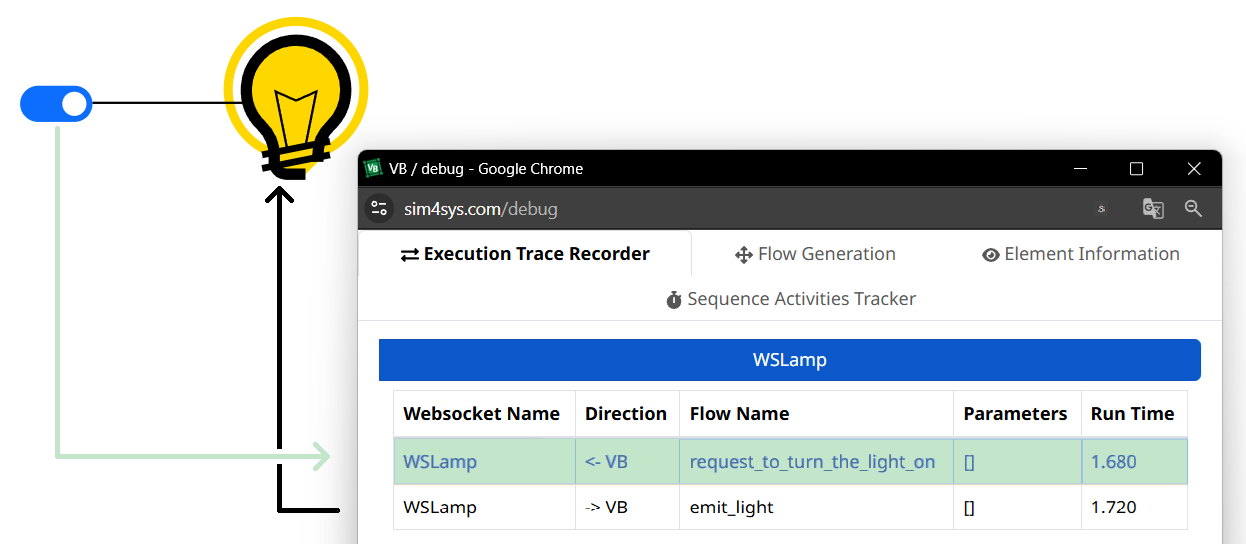
Debugging observations:
- Nothing is displayed, or an entire row of flows is missing in the debugger. This may mean that the flow that triggers a sequence is not being sent. Possible causes: a missing or incorrect controller or controller application that sends a flow from Virtual Bench.
- Only flows with green tag are displayed, or many flows with blue tag are missing in the debugger. The issue likely originates from the model used in your visualization. If parameters are in transit, check in the Parameters column that the values carried by the flow match those expected by your model. If they do not, check your controllers and controller applications. If there are no parameters or they are all correct, see Designer Debugging for further investigation.
- No flows are missing, but the scenario still does not work. This may indicate a missing controller or controller application when receiving a flow. If the controller or controller application exists, it may be misconfigured. If parameters are in transit, check in the Parameters column that the values carried by the flow match those expected from your model in Virtual Bench. If they do not, the issue may come from your model; see Designer Debugging for further investigation.
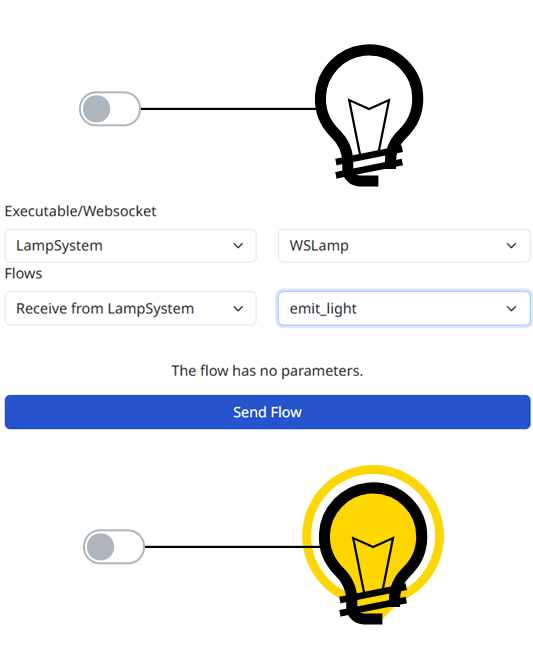
Flow Generation
In this tab, you can emulate flows from a model or send flows to a model. Please choose the model and its instance you want to use. Select the flow and its parameters values. It is useful to verify that the controllers validity when model are not available.
Element Information
This tab lets you observe the parameter values of a scenario element while a visualization scenario is running.
Only parameters of simple types (integer, decimal, and string) and enumerations are displayed.
This is useful to verify whether a controller application will have the intended effect.

Designer
If the issue does not appear to originate from the simulation, see Designer Debugging for further investigation.