General Information
Environments are the scenario workspaces in Virtual Bench. Each environment lets you view and edit one aspect of the scenario: 2D scene, user interface, timeline, or map.
Environment types
Virtual Bench provides four environment types:
| Type | Description | Documentation |
|---|---|---|
| Scene 2D | Top-down view of the real world: vehicles, drones, sensors, trajectories, etc. | Scene 2D |
| HMI | User interface (display and interaction). | HMI |
| Timeline | Scenario timeline: actions triggered by the time cursor. | Timeline |
| Map | Map support; dimensions adapt to zoom. | Map |
Creating an environment
In the ressource dialog, you can create environments by clicking on the New button. By default, it will propose to create a HMI environment. You can change the type of environment created using the combobox. But you can only create one Scene 2D, Timeline and Map by project. Only HMI environments is allowed multiple times by project.
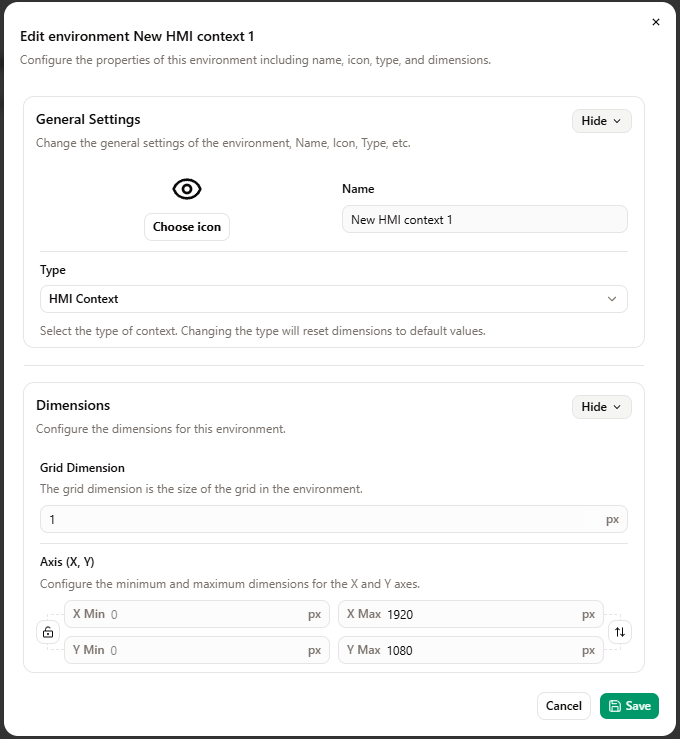
All environments have an Icon and a Name to define. But the Scene 2D and HMI environments also have dimensions to define.
When editing a scenario, the same dialog will pop-up but you will not be able to change the type of environment.
Common keyboard shortcuts
Several shortcuts are shared across environments (Scene 2D, HMI):
| Action | Shortcut |
|---|---|
| Move an element |  + drag and drop on the scene + drag and drop on the scene |
| Multiple selection |  + click on the desired elements + click on the desired elements |
Focusing on an environment
Switching the displayed environment
To focus on an environment:
- Open a scenario. This will open the main context of this scenario or the saved scenario configuration.
- In one of the environment view, use the combobox in the bottom-left corner to choose which environment to display.
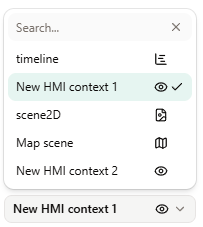
Zoom and Focus menu
Once in a environment view. Use the corresponding buttons to zoom in or out. You can also use your mouse wheel. You can also move in the environment to have the needed view by drag and dropping with your mouse.
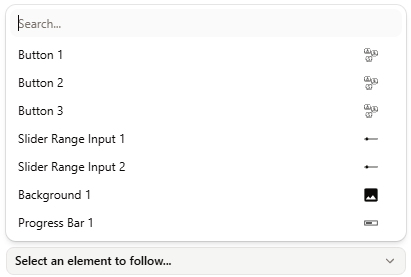
In the Scene 2D and HMI you can also focus on one element using the bottom-right combobox.
For more information see the Scenario Window Configuration.