Test criteria
This page explains how to create, configure, and manage test criteria at the project level.
Test Criteria
In your project, you can define test criteria to ensure it meets specific constraints and that values obtained during visualization runs match expected outcomes.
A test criterion compares two operands.
To create a new test criterion, click on the "+ New" button:  , which opens the following modal:
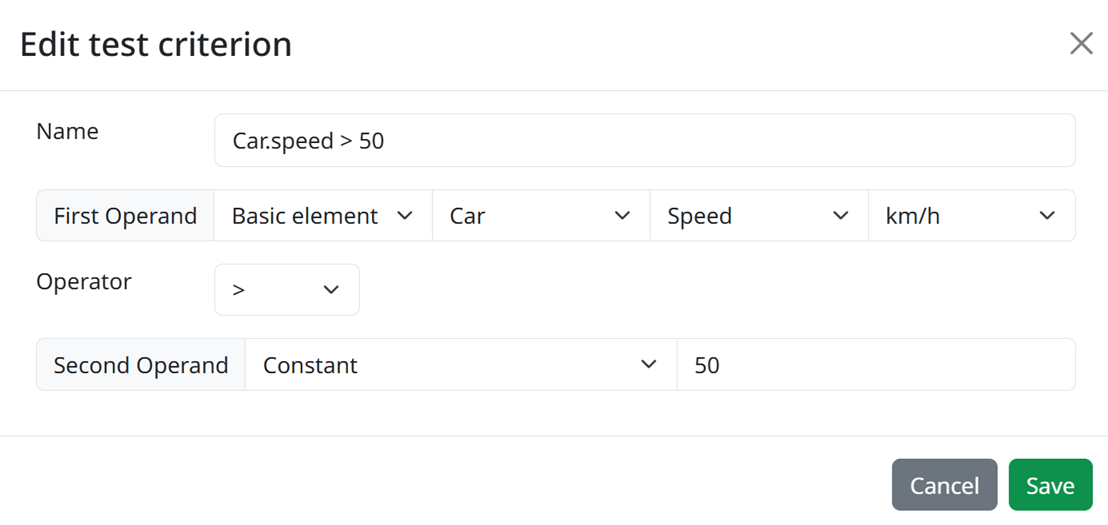
Additionally, you can:
- Rename the test criterion for clarity and organization,
- Define the first and second operands by choosing a basic elements, a project constant, or a literal constant. After selecting an element, specify a parameter,
- If applicable to the parameter, specify a unit,
- Select an appropriate operator for the comparison,
- Save the test criterion to store it within your project,
- Cancel the creation or modification of the test criterion if needed.
This feature helps maintain the integrity and accuracy of your project's visualizations, enabling validation of conditions and outcomes against predefined criteria.