Events
A controller is triggered by one event. An event lifeline is also an external variable, you can directly use parameters from this lifeline without having to add a new lifeline.
For example :
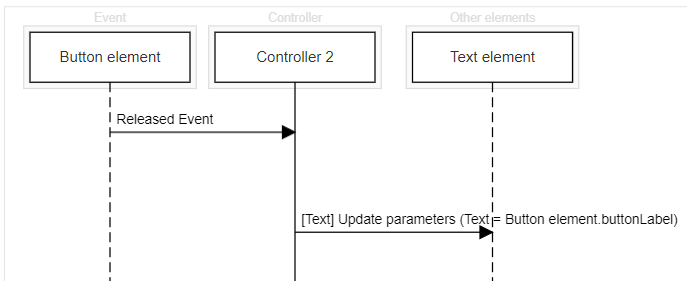
Available Events
When creating a controller, you will have to set an event. There are differents types of element that can be used as an event : Scenario elements, Scenario, Other Controller Application, Gamepad.
Scenario element
Scenario elements are elements that you can add to a scenario environment and interact with (e.g: button, text, car ...). Each of scenario elements have specific events, please check the element detailed page for more informations on the available events.
Model
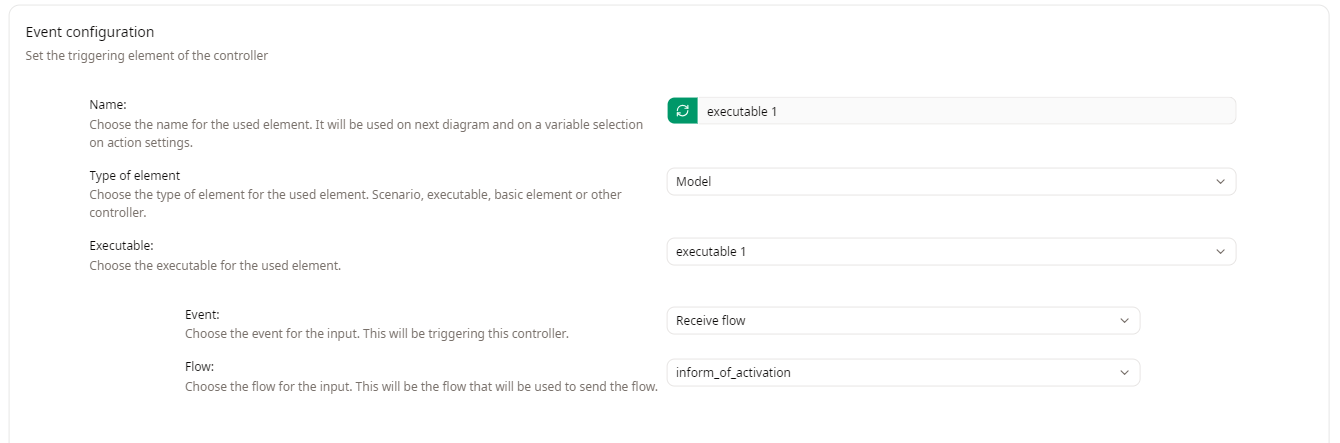
Model events allow you to trigger a controller when information is sent to or received from a model executable. Once you select the Model type, you will be able to choose the executable of your choice.
A controller with a Model event can be triggered by two ways by selecting an event for the input in the Event field :
- Receive flow
- Send flow
The Flow field below will display a list of available flows from the model to use.
Scenario
Scenario events are related to a scenario execution. You can trigger a controller :
- Before scenario execution start
- When scenario execution is paused
- When scenario execution is restarted
- After scenario execution stop
- Continuously during scenario execution
- Periodically during scenario execution
- Choose a period (in milliseconds). The controller will be triggered at each period interval.
Other Controller Application
This type of event allows you to select an existing controller as an event. The following events become available once another controller is selected :
- When controller action start
- When controller action end
Gamepad
This type of event allows you to use a gamepad input as an event to trigger a controller.