Number
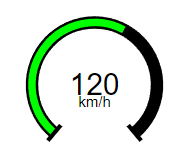
This element is a basic number display. The graphic origin of the Number corresponds to the geometric center of the Number. The particularity of this element is that you can choose how many decimals are after the point.
This element must be used with HMI context.
Icon

HMI Representation
-
Without a gauge

-
With a gauge
External parameters
You can edit the units
Show/Hide all parameters
| parameter | editable via "Parameter" tab | updatable via a controller | description | default unit | type |
|---|---|---|---|---|---|
| X-axis position | ✔️ | ✔️ | Position of the element on the X-axis. | px | Integer number |
| Y-axis position | ✔️ | ✔️ | Position of the element on the Y-axis. | px | Integer number |
| Visibility | ✔️ | ✔️ | This parameter allows you to choose if you want the element to be visible or not on the scene during the execution of the scenario. If the item is part of a group, it can inherit the value of that group. | - | Enumeration (visible, hidden, inherit) |
| Angle | ✔️ | ✔️ | Angle of rotation of the element compared to its initial position. | degree | Decimal number |
| Value | ✔️ | ✔️ | Value to display on scene. | - | Decimal number |
| Precision | ✔️ | ✔️ | Number of decimals after the point. | - | Integer number |
| Format | ✔️ | ✔️ | This parameter allows you to choose the separator for thousands. | - | Enumeration (Default, With spaces, With comas, With points) |
| Alignment | ✔️ | ✔️ | Alignment of the element. | - | Enumeration (Left align, Center align, Right align) |
| Font size | ✔️ | ✔️ | Number font size. | pt | Integer number |
| Color | ✔️ | ✔️ | Color of the element. This parameter can be edited. | - | Hexadecimal |
| Font style | ✔️ | ✔️ | Style of the font. | - | Enumeration (Regular, Italic, Bold, Bold Italic) |
| Style | ✔️ | ✔️ | CSS style of the element. You can change here parameters of the elements that are not already present in other fields. Choose a preset definition. | - | CSS |
| Unit | ✔️ | ❌ | Unit of the value displayed by the digital display. | - | Text |
| Activate gauge | ✔️ | ✔️ | Indicate if you want a gauge around the digital display | - | Enumeration (✔️, ❌) |
| Radius | ✔️ | ✔️ | Value of the radius of the gauge from the centre of the element | px | Decimal number |
| Start range | ✔️ | ✔️ | Lowest value displayed by the gauge. | - | Decimal number |
| End range | ✔️ | ✔️ | Highest value displayed by the gauge. | - | Decimal number |
| Gauge start angle | ✔️ | ✔️ | The angle from where the gauge's bow will start. You can change its value if you want to modify the distance traveled by the filling. | degree | Decimal number |
| Gauge coverage | ✔️ | ✔️ | The angle where the gauge's bow will end. You can change its value if you want to modify the distance traveled by the filling. | degree | Decimal number |
| Background color | ✔️ | ✔️ | Color of the gauge's background. This parameter can be edited. | - | Hexadecimal |
| Background width | ✔️ | ✔️ | Width of the gauge's background. | - | Integer number |
| Gauge color | ✔️ | ✔️ | Color of the gauge's filling. This parameter can be edited. | - | Hexadecimal |
| Gauge width | ✔️ | ✔️ | Width of the gauge's filling. | - | Integer number |
Triggered behaviours
See Actions page for more explanation.
Show/Hide all triggered behaviours
Destroy
At the reception of the flow, the element is destroy.
No parameters for this triggered behaviour.
| triggered behaviours | parameter | description | unit | type |
|---|---|---|---|---|
| Number increment | Value | The number added to the counter each time the flow is sent or received | none | Decimal |
| Number decrement | Value | The number subtracted to the counter each time the flow is sent or received | none | Decimal |
Events
See Events page for more explanation.
Show/Hide all events
| event | description |
|---|---|
| On Parameter Value Changed | The element can send information to the model when the value of the selected parameter has changed |
| At initialization | The number can send information to the model once at initialization |
| Continually | The number can send information to the model continuously |