Pedestrian
This element is a basic pedestrian. The graphic origin of the pedestrian corresponds to the geometric center of the pedestrian.
| Is an equipment | ❌ |
| Can have equipment | ✔️ |
This element must be used with 2D scene context.
Icon

2D Representation

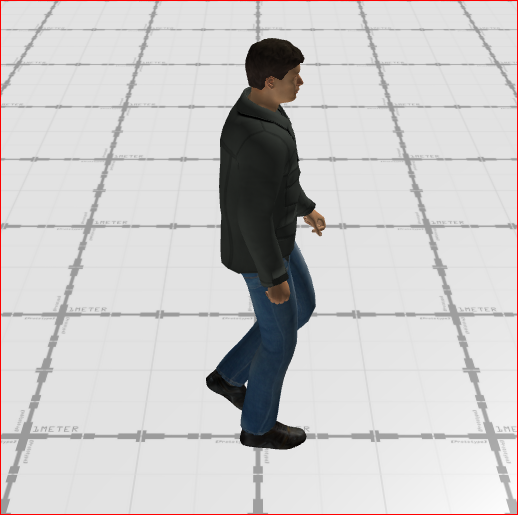
3D Representation
External parameters
You can edit the units
Show/Hide all parameters
| parameter | editable via "Parameter" tab | updatable via a controller | description | default unit | type |
|---|---|---|---|---|---|
| X-axis position | ✔️ | ✔️ | Position of the element on the X-axis. | meter | Decimal number |
| Y-axis position | ✔️ | ✔️ | Position of the element on the Y-axis. | meter | Decimal number |
| Z-axis position | ❌ | ❌ | Position of the element on the Z-axis. | meter | Decimal number |
| X-axis angle | ❌ | ❌ | Angle of the element on the X-axis. | degree | Decimal number |
| Y-axis angle | ❌ | ❌ | Angle of the element on the Y-axis. | degree | Decimal number |
| Z-axis angle | ✔️ | ✔️ | Angle of rotation of the element compared to its initial position. | degree | Decimal number |
| Speed | ✔️ | ✔️ | Speed of the element. This parameter can be profile. | kilometers per hour | Decimal number |
| Accel. coeff. | ✔️ | ✔️ | Acceration of the element. | kilometers per hour squared | Decimal number |
| Color | ✔️ | ✔️ | Color of the element. This parameter can be edited. | - | Hexadecimal |
| Trajectory | ✔️ | ❌ | Trajectory of the scene that the element will follow. | - | Enumeration |
| Curvilinear position | ✔️ | ✔️ | Position on the trajectory. | meter | Decimal number |
| Visibility | ✔️ | ✔️ | This parameter allows you to choose if you want the element to be visible or not on the scene during the execution of the scenario. If the item is part of a group, it can inherit the value of that group. | - | Enumeration (visible, hidden, inherit) |
| Threshold zoom out | ✔️ | ❌ | Zoom level from which its representation on the scene is no longer modified. | % | Decimal number |
| Length | ❌ | ❌ | Length of the element. | meter | Decimal number |
| Width | ❌ | ❌ | Width of the element. | meter | Decimal number |
| Height | ❌ | ❌ | Height of the element. | meter | Decimal number |
| longitude coordinate | ❌ | ❌ | Automatically calculated longitude value, based on the origin defined for the context and the position of the element. | degree | Decimal number |
| latitude coordinate | ❌ | ❌ | Automatically calculated latitude value, based on the origin defined for the context and the position of the element. | degree | Decimal number |
Triggered behaviours
See Actions page for more explanation.
Show/Hide all triggered behaviours
Destroy
At the reception of the flow, the element is destroy.
No parameters for this triggered behaviour.
Update Trajectory
| parameter | editable via "Parameter" tab | updatable via a controller | description | default unit | type |
|---|---|---|---|---|---|
| Reset Curvilinear Position | ❌ | ✔️ | Update position on the trajectory. | meter | Decimal number |
| Trajectory Name | ❌ | ✔️ | Name of the trajectory that the car will follow. | - | TextType |
Events
See Events page for more explanation.
Show/Hide all events
| event | description |
|---|---|
| On Parameter Value Changed | The element can send information to the model when the value of the selected parameter has changed |
| At initialization | The pedestrian can send information to the model once at initialization |
| Continually | The pedestrian can send information to the model continuously |