Controllers presentation
WHAT IS IT ?
Controllers are used to modify scenarios states, scenario elements, or to send data to model instances.
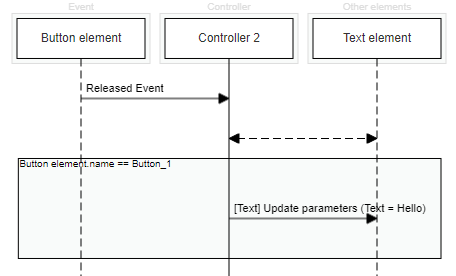
A controller is represented by a sequence diagram which shows interactions between different objects over time. It is read sequencially from top to bottom.
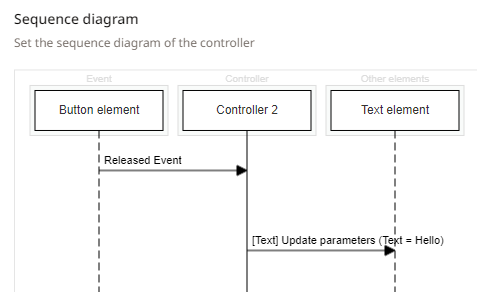
In the image above, the controller is triggered by a button that sends a released event. When the controller receives this event, it will send the action to a text element in order to update its value.
A controller can only have one event.
The main concepts of the controllers are explained below and detailed in the other controllers pages.
LIFELINES
In a controller configuration, lifelines represent elements that interact with the controller. Below is a list of the available elements for a lifeline :
| Element type | Description |
|---|---|
| Scenario Element | All scenario elements that are available in a scenario. |
| Model | To retrieve flows informations from a model or to send flows to a model. |
| Input parameter | A parameter that can be changed for each application of a controller. |
| Scenario | Properties of the current scenario. |
| Group | A group of scenario elements. |
| Gamepad | A connected gamepad. |
INTERACTIONS
Events
Events are represented by a plain arrow going from the Event lifeline to the controller. It is the event that triggers the controller.

External variables
External variables are represented by a double dashed arrow between the controller and a lifeline. It is used to retrieve all the parameters of an element. The controller will then have access to those parameters.

Actions
Actions are represented by a plain arrow going from the controller to a lifeline. Actions are used to update elements or trigger effects on scenario elements.

Conditions
Conditions are represented by a rectangle, with one or multiple actions inside it, allowing to trigger a controler only when specific conditions are met.