HMI enumerations
This page explains how to create, configure, and manage HMI enumerations at the project level.
HMI Enumerations
Add a new HMI Enumeration
HMI Enumerations, which are utilized across the entire project, are listed here. To introduce a new HMI Enumeration, select the "HMI enumerations" tab in the Resources modal, and click on the "+ New" button: 
The creation and customization of your new enumeration are facilitated through the following pop-up:
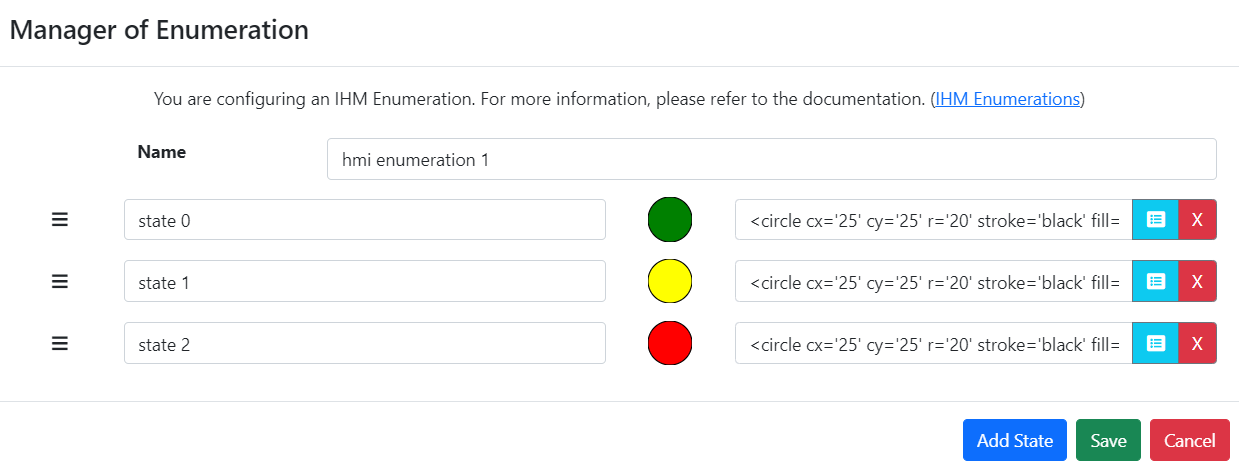
The features available for managing your HMI enumeration include:
- Renaming the HMI enumeration,
- Renaming the states,
- Assigning an SVG to each state and previewing it in the list of states,
- Reusing a saved SVG from the library:
- Adding another state by clicking the "Add state" button:

- Removing a state by clicking on:
- Saving the HMI enumeration,
- Cancelling the creation or modification of the HMI enumeration.
Once created, the new HMI enumeration is displayed in the HMI enumeration list:

For each HMI enumeration, you can:
- Edit the enumeration by clicking on
- Delete the enumeration by clicking on
Editing an HMI Enumeration
To edit an HMI enumeration, simply click on (edit icon). This action will opens the enumeration manager pop-up, allowing you to make changes:
See above for details on what you can do in this manager.
Deleting an HMI Enumeration
Deleting an HMI enumeration is initiated by clicking on (delete icon). A confirmation modal will open:
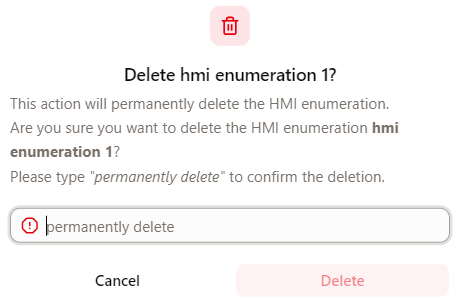
Enter the required value in the input and click the Delete button to confirm.