Hour display
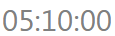
This element is a basic display of the hour. The graphic origin of the Date input corresponds to the geometric center of the Date input. The particularity of this element is you can display an hour in the format HH:MM:SS. You can change these parts separately and change their font-color.
This element must be used with HMI context.
Icon

HMI Representation
External parameters
You can edit the units
Show/Hide all parameters
| parameter | editable via "Parameter" tab | updatable via a controller | description | default unit | type |
|---|---|---|---|---|---|
| Hour | ✔️ | ✔️ | Value of hour field (valid only with "HH:MM:SS Mode"). | - | Integer number |
| Minute | ✔️ | ✔️ | Value of minute field (valid only with "HH:MM:SS Mode"). | - | Integer number |
| Second | ✔️ | ✔️ | Value of second field (valid only with "HH:MM:SS Mode"). | - | Integer number |
| Mode | ✔️ | ✔️ | This parameter allows you to choose which display mode you want on the scene during the execution of the scenario. | - | Enumeration (Hour minute second, Only seconds) |
| Seconds | ✔️ | ✔️ | Value of second field (valid only with "Only seconds Mode"). | - | Integer number |
| Style | ✔️ | ✔️ | CSS style of the element. You can change here parameters of the elements that are not already present in other fields. Choose a preset definition. | - | CSS |
| X-axis position | ✔️ | ✔️ | Position of the element on the X-axis. | px | Integer number |
| Y-axis position | ✔️ | ✔️ | Position of the element on the Y-axis. | px | Integer number |
| Color | ✔️ | ✔️ | Color of the element. This parameter can be edited. | - | Hexadecimal |
| Visibility | ✔️ | ✔️ | This parameter allows you to choose if you want the element to be visible or not on the scene during the execution of the scenario. If the item is part of a group, it can inherit the value of that group. | - | Enumeration (visible, hidden, inherit) |
| Width | ❌ | ❌ | Length of the element on the X-axis. | px | Integer number |
| Height | ❌ | ❌ | Width of the element on the Y-axis. | px | Integer number |
| Angle | ✔️ | ✔️ | Angle of rotation of the element compared to its initial position. | degree | Decimal number |
Triggered behaviours
See Actions page for more explanation.
Show/Hide all triggered behaviours
Destroy
At the reception of the flow, the element is destroy.
No parameters for this triggered behaviour.
Events
See Events page for more explanation.
Show/Hide all events
| event | description |
|---|---|
| On Parameter Value Changed | The element can send information to the model when the value of the selected parameter has changed |
| At initialization | The hour display can send information to the model once at initialization |
| Continually | The hour display can send information to the model continuously |