Time input
This element is a basic clock. The graphic origin of the Time input corresponds to the geometric center of the Time input. The particularity of this element is you can change Time input element when simulation is running. Value modification is done by writing on it or just clicking on the clock. Hour can also be initialised with element parameter tab before simulation.
This element must be used with HMI context.
Icon

HMI Representation
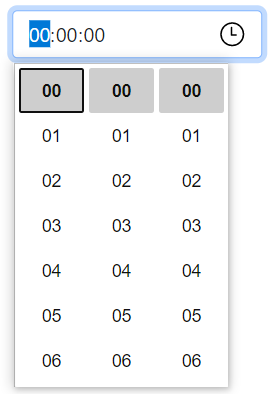
External parameters
You can edit the units
Show/Hide all parameters
| parameter | editable via "Parameter" tab | updatable via a controller | description | default unit | type |
|---|---|---|---|---|---|
| Inputs | ✔️ | ✔️ | Value of hour and minute fields. | - | HH:MM |
| X-axis position | ✔️ | ✔️ | Position of the element on the X-axis. | px | Integer number |
| Y-axis position | ✔️ | ✔️ | Position of the element on the Y-axis. | px | Integer number |
| Visibility | ✔️ | ✔️ | This parameter allows you to choose if you want the element to be visible or not on the scene during the execution of the scenario. If the item is part of a group, it can inherit the value of that group. | - | Enumeration (visible, hidden, inherit) |
| Width | ❌ | ❌ | Length of the element on the X-axis. | px | Integer number |
| Height | ❌ | ❌ | Width of the element on the Y-axis. | px | Integer number |
| Hour field | ❌ | ❌ | Value of hour. | - | Integer number |
| Minute field | ❌ | ❌ | Value of minute. | - | Integer number |
| Second field | ❌ | ❌ | Value of second. | - | Integer number |
| Angle | ✔️ | ✔️ | Angle of rotation of the element compared to its initial position. | degree | Decimal number |
Triggered behaviours
See Actions page for more explanation.
Show/Hide all triggered behaviours
Destroy
At the reception of the flow, the element is destroy.
No parameters for this triggered behaviour.
Events
See Events page for more explanation.
Show/Hide all events
| event | description |
|---|---|
| On Parameter Value Changed | The element can send information to the model when the value of the selected parameter has changed |
| At initialization | The Time input can send information to the model once at initialization |
| Continually | The Time input can send information to the model continuously |
| On change | The Time input can send selected hour to the model when hour changes (hour, minute, second) |